Postingan

Membuat BLOG lebih berwarna
Gambar
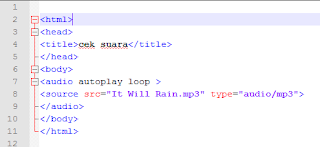
Menambah audio di HTML itu menggunakan tag <audio>  <source src="nama.mp3" type="audio/mp3">  </audio> Macam macam tag yang bisa digunakan di HTML contohnya : 1. autoplay  = untuk langsung memulai audio 2. controls   = untuk mengontrol audio 3. loop         = untuk memutar berulang kali secara otomatis 4. src            = untuk menambahkan sumber lagu contoh coding
k3

Gambar
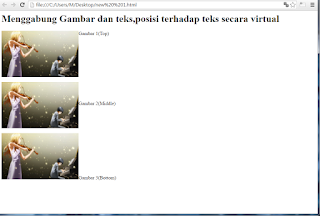
<html> <head>     <title>Ini Bagian Web Saya</title> </head> <body>     <h1>Menggabung Gambar dan teks,posisi terhadap teks secara virtual</h1>      <p><img src="anim13.jpg" width="250px" height="150px" align="top">Gambar 1(Top)</img>      <p><img src="anim13.jpg" width="250px" height="150px" align="middle">Gambar 2(Middle)</img>      <p><img src="anim13.jpg" width="250px" height="150px" align="bottom">Gambar 3(Bottom)</img> </body> </html> hasil;

k1

Gambar
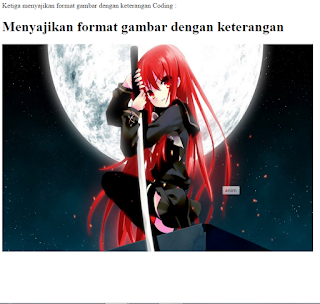
Ketiga menyajikan format gambar dengan keterangan Coding : <html>  <head>     <title>Ini Web saya</title>  </head>  <body>  <h1>Menyajikan format gambar dengan keterangan</h1>      <img title="anim" src="anim1.jpg" align="center" width="720px" height="480px"></img>  </body> </html>  hasil:

k2

Gambar
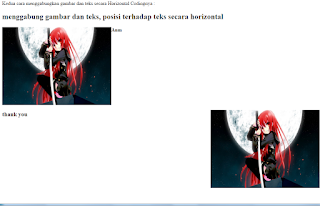
<html>                    <head>         <title>Ini Web Saya</title>             <h2><b>menggabung gambar dan teks, posisi terhadap teks secara horizontal</h2>     </head>         <body>    <p><img src="mbrew.jpg" width="350px" height="250px" align="top" align="left">Siap bantu walau cuman</img><br>     <p><img src="mbrew.jpg" width="350px" height="250px" align="right" align="bottom" align="right"><h3>dapet thank you</h3></img>         </body> </html> hasil:

Halaman Layout

Gambar
inilah lanjutan dari  kegiatan sebelum nya yaitu adalah kegiatan 7 <html> <Head>     <title>INI WEB SAYA</title> </Head> <body>         <table bgcolor="#F0F0F0" border="1" width="720px" height="360px">             <tr><td bgcolor="#00FF0F" rowspan="3" align="bottom" width="120px">             <ul type="disc">             <li>Home<br></li>             <li>Profil<br></li>             <li>About us<br></li>             <li>Blog<br></li>      ...

INILAH P.WEB KEGIATAN 5

Gambar
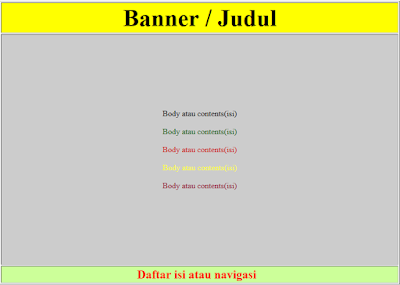
Hai semua kembali lagi nih bagi kalian yang mencari tugas dari guru di sekolah disini lah solusinya pemprgraman web KEGIATAN 5  Top Index <!DOCTYPE html> <head> <title>Top index</title> </head> <body> <form id="form1" name="form1" method="post" action=""> <table width="800" height="542" border="1" align="center"> <tr> <td height="23" align="center" bordercolor="#FFFFFF" bgcolor="#FFFF00"><strong><font size="+5">Banner atau iklan</font></strong></td> </tr> <tr> <td height="27" align="center" bgcolor="#FFCCCC"><font color="#FF0000">Daftar isi atau navigasi </font></td> </tr> <tr> <td height="457" align="center" bgcolor="#FF66CC"> ...

INI ADALAH KEGIATAN 6 DARI PEMBLAJARAN P.WEB

Gambar
The table is a way to display the information in the form of a cell consisting of rows and columns . Tables are created using the <table >. A table is divided into rows , and each row is divided into cells . Line is made with the < tr>, and cells that will form the columns are made with the < td>. In the context of HTML , the table has a very important role . Besides being used to display a table containing the data , tables are also used to compose text in a column , or make other structured reports Coding: <!DOCTYPE html> <head> <title>Top index</title> </head> <body> <form id="form1" name="form1" method="post" action="">   <table width="800" height="542" border="1"   align="center">     <tr>      <td height="23" align="center" bordercolor="#FFFFFF" ...